By Sophia • Difficulty: Moderate


- Remove the SIM & SD card trays first.


- Remove the battery door—it's fastened tightly by clips. Free the clips with your fingernail or a pry tool.
- Be careful because the midframe is easily scratched, and the glass at the top of the battery door is easily broken.


- Remove the torx screws on the back.


- Remove the loudspeaker by prying it up with a spudger.


- Remove the securing brackets covering the motherboard.
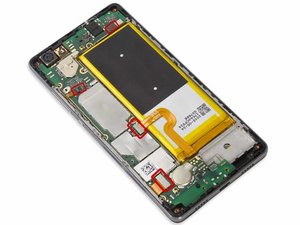


- Carefully release all the connectors on the board, and remove the motherboard.
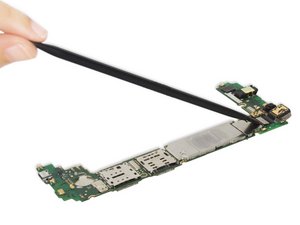


- Remove the rear camera and front camera.


- Remove the battery. There is strong adhesive under the battery—work carefully to pry it free and be careful not to puncture the battery.
- Try an iOpener or hairdryer to heat the adhesive behind the battery. This softens the adhesive, making it easier to release the battery.


- Remove the motor vibrator.

- Remove the sensor flex. It's covered under the digitizer flex and fastened by adhesive.

- Remove the earpiece speaker.


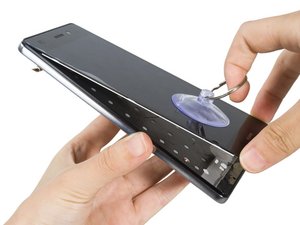
- Heat, cut the adhesive sticker and remove the screen carefully.

